Kennisbank
november 26, 2019 2026-08-01 13:48Kennisbank
Kennisbank
Blijf op de hoogte
Op zoek naar betrouwbare informatie over hersenletsel en herstel? In onze kennisbank vind je artikelen over niet-aangeboren hersenletsel, hersenschuddingen, neuroplasticiteit en de laatste inzichten op het gebied van herstel en behandeling.

Het brein: een netwerk van miljarden verbindingen
De kracht van ons brein zit in de verbindingen: sterke netwerken tussen hersengebieden vormen de basis voor leren, functioneren en herstel. …

Het beschadigde brein: wat gebeurt er na hersenletsel?
Na niet-aangeboren hersenletsel kan de samenwerking tussen hersengebieden verstoord raken, waardoor informatie minder efficiënt wordt verwerkt en klachten kunnen ontstaan. …

Neuroplasticiteit: Hoe het brein kan herstellen
Het brein blijft veranderbaar. Ontdek hoe neuroplasticiteit zorgt voor mogelijkheden om verbindingen te versterken en herstel te ondersteunen. …
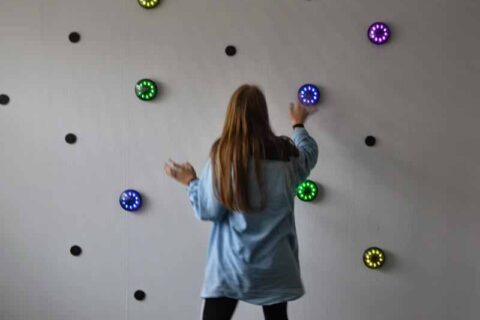
Neuroplasticiteit: Hoe train je het brein gericht?
Ontdek waarom de juiste prikkel, uitdaging en herhaling essentieel zijn om het brein gericht te trainen. …

Herstel na hersenletsel: verder kijken dan omgaan met klachten
Een andere kijk op herstel: van aanpassen aan beperkingen naar het opnieuw trainen van het brein. …

Je denkt dat je ontspant, maar je brein maakt overuren.
Scrollen, gamen of series kijken voelt als rust, maar vraagt vaak nog veel van je brein. Lees hoe je het zenuwstelsel weer leert ontspannen. …
Veelgestelde vragen
We begrijpen dat je graag wilt weten wat je kunt verwachten. Daarom hebben we de meest voorkomende vragen verzameld.
Staat jouw vraag er niet tussen? Neem contact met ons op - telefonisch of via het contactformulier.
Doelgroep
Voor wie is REWIRE geschikt?
REWIRE is bedoeld voor mensen met aanhoudende klachten na een hersenschudding, beroerte of ander niet-aangeboren hersenletsel. Het programma is geschikt wanneer klachten zoals vermoeidheid, overprikkeling, concentratieproblemen, hoofdpijn of duizeligheid je belemmeren in werk, studie, sport of het dagelijks leven. Ook wanneer je al meerdere behandelingen hebt gevolgd en je herstel is vastgelopen, kan REWIRE een passende vervolgstap zijn.
Twijfel je of REWIRE bij jou past? Tijdens een vrijblijvend adviesgesprek bespreken we jouw situatie en geven we een eerlijk advies. Je zit nergens aan vast.
Voor wie is REWIRE NIET geschikt?
REWIRE is niet voor iedereen de juiste keuze. Om optimaal van het programma te profiteren, is het belangrijk dat de behandeling aansluit bij jouw hulpvraag en belastbaarheid.
REWIRE is in principe niet geschikt wanneer:
- Je klachten voornamelijk worden veroorzaakt door Long COVID of een burn-out. Hoewel sommige klachten kunnen overlappen met niet-aangeboren hersenletsel, vraagt deze problematiek om een andere behandeling.
- Je door lichamelijke beperkingen op dit moment niet in staat bent om zelfstandig voor jezelf te zorgen of deel te nemen aan een intensief behandelprogramma.
- Je nog in een acute medische fase zit of eerst verdere medische behandeling of revalidatie nodig hebt.
- Je niet in staat of bereid bent om actief aan je herstel te werken. Het REWIRE-traject vraagt een actieve inzet, zowel tijdens de behandelweek als bij het thuisprogramma.
Twijfel je of REWIRE bij jouw situatie past? Dan denken we graag met je mee. Tijdens een vrijblijvend adviesgesprek bespreken we jouw klachten, voorgeschiedenis en hulpvraag. Wanneer wij denken dat een andere vorm van zorg beter aansluit, zullen we dat eerlijk aangeven en je, waar mogelijk, adviseren over een passend vervolg.
Welke klachten behandelt REWIRE?
REWIRE is bedoeld voor mensen met aanhoudende klachten na een hersenschudding, beroerte of ander niet-aangeboren hersenletsel. Het programma is geschikt wanneer klachten zoals vermoeidheid, overprikkeling, concentratieproblemen, hoofdpijn of duizeligheid je belemmeren in werk, studie, sport of het dagelijks leven. Ook wanneer je al meerdere behandelingen hebt gevolgd en je herstel is vastgelopen, kan REWIRE een passende vervolgstap zijn.
Twijfel je of REWIRE bij jou past? Tijdens een vrijblijvend adviesgesprek bespreken we jouw situatie en geven we een eerlijk advies. Je zit nergens aan vast.
Welke klachten behandelt REWIRE NIET?
REWIRE is gespecialiseerd in de behandeling van onzichtbare klachten na een hersenschudding of ander niet-aangeboren hersenletsel (NAH). Ons traject is daarom niet geschikt voor klachten die specialistische medische zorg of een andere vorm van revalidatie vereisen, zoals:
- Uitval van arm of been, bijvoorbeeld krachtsverlies of verlamming.
- Spraak- en taalproblemen, zoals moeite met spreken of het begrijpen van taal.
- Psychische klachten die op de voorgrond staan en specialistische behandeling vereisen.
- Acute of verergerende neurologische klachten, zoals nieuwe uitvalsverschijnselen, epileptische aanvallen of andere klachten die directe medische beoordeling nodig hebben.
Twijfel je of jouw klachten binnen ons traject passen? Neem gerust contact met ons op voor een vrijblijvend adviesgesprek. We bekijken graag samen of REWIRE aansluit bij jouw hulpvraag.
Mag ik ook deelnemen als het letsel al lang(er) geleden is?
Ja. Ook wanneer je hersenletsel maanden of zelfs jaren geleden is ontstaan, kun je in aanmerking komen voor REWIRE. Hoewel de hersenen in de eerste periode na het letsel extra gevoelig zijn voor neuroplasticiteit, behouden zij ook daarna het vermogen om nieuwe verbindingen te maken en zich aan te passen. Daarom kan gerichte hersentraining ook op langere termijn nog waardevol zijn.
Of het REWIRE-traject bij jouw situatie past, hangt niet alleen af van wanneer het letsel is ontstaan, maar vooral van de klachten die je nu ervaart, jouw belastbaarheid en jouw persoonlijke doelen. Tijdens het diagnostisch traject beoordelen we zorgvuldig of het programma aansluit bij jouw situatie.
Met welke leeftijd kan ik deelnemen?
REWIRE hersentraject is bedoeld voor volwassenen tussen 18 en 65 jaar.
Moet ik eerst een revalidatietraject of behandeling hebben gevolgd?
Nee, een eerder revalidatietraject of behandeling is niet noodzakelijk. Sommige deelnemers hebben al meerdere behandelingen gevolgd, terwijl anderen zich juist eerder in hun herstelproces aanmelden. Tijdens het vrijblijvende adviesgesprek beoordelen we samen of REWIRE op dit moment aansluit bij jouw hulpvraag en de juiste stap is in jouw herstel.
Traject
Hoe lang duurt het traject?
Het REWIRE-traject duurt ongeveer zes maanden. Het begint met een uitgebreid diagnostisch traject, gevolgd door een intensieve vijfdaagse interne revalidatieweek op Landgoed Ulvenhart. Daarna ga je thuis verder met een persoonlijk trainingsprogramma, waarbij je gedurende het traject wordt begeleid en de voortgang regelmatig wordt geëvalueerd. Zo werken we stap voor stap aan duurzaam herstel en weer mee kunnen doen in het dagelijks leven.
Waar vindt het traject plaats?
Het grootste deel van het REWIRE-traject volg je vanuit je eigen thuissituatie. De neuropsychologische screening vindt online plaats via Microsoft Teams en de sporttest wordt afgenomen in jouw eigen omgeving. Alleen de intensieve vijfdaagse interne revalidatieweek vindt plaats op Landgoed Ulvenhart in Ulvenhout, waar je verblijft op basis van volpension.
Na de behandelweek ga je thuis verder met een persoonlijk trainingsprogramma. Wanneer aanvullende begeleiding in de eerstelijnszorg wenselijk is, werken we samen met zorgverleners bij jou in de buurt en zorgen we voor een goede overdracht.
Met hoeveel deelnemers volg ik het traject?
De behandelweek volg je met maximaal drie andere deelnemers. Zo hebben onze therapeuten de tijd om jou optimaal en persoonlijk te begeleiden.
Is het traject zwaar?
Het REWIRE-traject is intensief en vraagt een actieve inzet. Juist daarom stemmen we de training af op jouw belastbaarheid. We zoeken steeds de juiste balans tussen uitdaging, herstel en rust, zodat je op een verantwoorde manier kunt werken aan jouw herstel. Wel is een minimale belastbaarheid wenselijk, zodat je meerdere trainingen per dag aan kan.
Kan mijn partner betrokken worden bij het traject?
Het is niet de bedoeling dat je samen met je partner of mantelzorg verblijft tijdens de revalidatieweek. Wel vinden we het belangrijk dat mensen uit jouw omgeving begrijpen wat niet-aangeboren hersenletsel betekent en hoe zij jou kunnen ondersteunen. Daarom betrekken we, waar gewenst, je partner of mantelzorger bij onderdelen van het traject.
Waarom verblijf ik een week op locatie?
Tijdens de interne revalidatieweek verblijf je in een rustige omgeving, weg van de dagelijkse prikkels en verplichtingen. Hierdoor kun je je volledig richten op jouw herstel en kunnen we de training gedurende meerdere dagen zorgvuldig opbouwen. De combinatie van intensieve begeleiding, een gestructureerd programma en voldoende rust creëert de beste voorwaarden om nieuwe vaardigheden aan te leren en de basis te leggen voor het thuiswerkprogramma.
Hoeveel tijd kost het thuiswerkprogramma?
Het thuisprogramma is een belangrijk onderdeel van het REWIRE-traject. Gemiddeld oefen je 3 tot 4 keer per week. De oefeningen worden zoveel mogelijk geïntegreerd in jouw dagelijkse leven, zodat ze zo min mogelijk extra tijd kosten. Juist door te oefenen in situaties die voor jou betekenisvol zijn, sluiten de trainingen aan bij jouw persoonlijke doelen en is de kans op duurzaam herstel groter.
Indien nodig werken we samen met zorgverleners in de eerste lijn, zoals een fysiotherapeut, ergotherapeut of andere behandelaar bij jou in de regio. Deze begeleiding kan een waardevolle aanvulling zijn op het thuisprogramma en helpt om de training ook dicht bij huis voort te zetten.
Hoe ziet het traject eruit?
Het REWIRE-traject is een persoonlijk en multidisciplinair behandelprogramma dat volledig wordt afgestemd op jouw klachten, doelen en belastbaarheid. Het traject duurt gemiddeld zes maanden en bestaat uit de volgende stappen:
- Vrijblijvend adviesgesprek
We bespreken jouw klachten, voorgeschiedenis en hulpvraag en bekijken samen of REWIRE bij jou past. - Online vragenlijsten
Je vult verschillende vragenlijsten in om een goed beeld te krijgen van jouw klachten en dagelijks functioneren. - Multidisciplinaire beoordeling
Ons behandelteam beoordeelt jouw aanmelding en bepaalt of het traject passend is. - Uitgebreide diagnostiek
We brengen jouw fysieke, cognitieve en mentale belastbaarheid in kaart om de behandeling optimaal af te stemmen. - Intensieve behandelweek
Tijdens een vijfdaags verblijf werk je samen met ons multidisciplinaire team aan jouw persoonlijke hersteldoelen. - Persoonlijk thuisprogramma
Na de behandelweek ga je thuis verder met een op maat gemaakt oefenprogramma, waarbij je gemiddeld 3 tot 4 keer per week oefent. De oefeningen worden zoveel mogelijk geïntegreerd in jouw dagelijks leven. - Online begeleiding
Tijdens het traject plannen we meerdere evaluatiemomenten om jouw voortgang te bespreken en het programma waar nodig aan te passen. - Eindmeting en persoonlijk advies
Aan het einde van het traject herhalen we de belangrijkste metingen en bespreken we jouw resultaten, de behaalde doelen en eventuele vervolgstappen.
Welke trainingen kan ik verwachten tijdens de behandelweek?
Tijdens de behandelweek doorloop je steeds een cyclus van fysieke training, dubbeltaaktraining en rust & ontspanning. Deze cyclus wordt gedurende de week stapsgewijs uitdagender, waarbij de trainingen altijd worden afgestemd op jouw persoonlijke situatie en belastbaarheid. Afhankelijk van jouw klachten kunnen de trainingen onder andere bestaan uit cognitieve training, visuele training, balansoefeningen, nekstabiliteit en het verbeteren van de samenwerking tussen de ogen en het evenwichtssysteem. Tijdens de rustmomenten is er aandacht voor herstel, onder andere met hartcoherentietraining, ontspanningsmassage en optioneel acupunctuur.
Ik heb al (verschillende) andere behandeling(en) gehad, heeft REWIRE dan nog zin?
Ja, juist veel deelnemers aan REWIRE hebben al een uitgebreid behandeltraject achter de rug. Denk aan fysiotherapie, ergotherapie, psychologie, revalidatie of andere vormen van begeleiding. Toch blijven zij beperkingen ervaren in hun dagelijks leven.
REWIRE richt zich niet op één afzonderlijke klacht, maar op het functioneren van het brein als geheel. Met uitgebreide diagnostiek brengen we in kaart welke factoren jouw herstel nog belemmeren. Op basis daarvan stellen we een persoonlijk trainingsprogramma op, waarbij we gebruikmaken van de principes van neuroplasticiteit: het vermogen van de hersenen om nieuwe verbindingen te maken en zich aan te passen.
Hoewel we herstel nooit kunnen garanderen, zien we dat veel deelnemers na het traject weer meer kunnen ondernemen, minder klachten ervaren en beter kunnen deelnemen aan werk, studie, sport of het dagelijks leven. Tijdens het vrijblijvende adviesgesprek bekijken we samen of REWIRE in jouw situatie passend kan zijn.
Resultaten en herstel
Garanderen jullie herstel?
Nee. Iedereen met niet-aangeboren hersenletsel is anders en ieder herstelproces verloopt op een eigen manier. Daarom kunnen en willen wij geen garantie geven op herstel.
Wat we wél garanderen, is een persoonlijk en specialistisch behandeltraject dat volledig is afgestemd op jouw situatie. Door gebruik te maken van de nieuwste inzichten in neuroplasticiteit en een intensieve multidisciplinaire aanpak, creëren we de best mogelijke voorwaarden om jouw herstel te ondersteunen en je te helpen weer mee te kunnen doen in het dagelijks leven.
Wanneer merk ik resultaat?
Iedereen herstelt op zijn eigen tempo. Sommige deelnemers ervaren al tijdens of kort na de revalidatieweek de eerste veranderingen, bijvoorbeeld in energie, belastbaarheid, concentratie of het omgaan met klachten.
Bij anderen verloopt het herstel geleidelijker en is meer tijd nodig om vooruitgang te merken. Het brein heeft tijd nodig om nieuwe verbindingen aan te maken en zich aan te passen. Daarom zien we vaak dat verbeteringen zich gedurende het verdere traject van ongeveer zes maanden verder ontwikkelen.
Vergoedingen en praktische zaken
Heb ik een verwijzing nodig van mijn huisarts of specialist?
Nee, je hebt geen verwijzing nodig om deel te nemen aan het Rewire-traject. Je kunt jezelf aanmelden voor een vrijblijvend adviesgesprek. Tijdens dit gesprek bespreken we jouw klachten, hulpvraag en situatie om te beoordelen of het traject passend is.
Wanneer nodig stemmen we af met jouw behandelend arts of andere zorgverleners die bij jouw herstel betrokken zijn.
Wordt het traject vergoed door mijn zorgverzekering?
Het REWIRE-traject wordt momenteel niet vergoed vanuit de basisverzekering. Afhankelijk van jouw situatie zijn er mogelijk andere vergoedingsmogelijkheden, bijvoorbeeld via een werkgever, arbodienst, letselschadeverzekering of een persoonsgebonden budget (pgb). We denken graag met je mee over de mogelijkheden.
Wat kost het traject?
De kosten van het complete REWIRE-traject bedragen € 6.500. Dit is inclusief de uitgebreide diagnostiek, de vijfdaagse interne revalidatieweek op basis van volpension, het persoonlijke thuiswerkprogramma en de begeleiding gedurende het zes maanden durende traject.
Het REWIRE-traject wordt momenteel niet vergoed vanuit de basisverzekering. In sommige situaties zijn er wel andere vergoedingsmogelijkheden, bijvoorbeeld via een werkgever, arbodienst of letselschadeverzekering. We denken graag met je mee over de mogelijkheden.
Hoe meld ik mij aan?
Aanmelden is eenvoudig. Vul het contactformulier op onze website in of doe eerst de online test om te kijken of REWIRE mogelijk bij jouw situatie past. Vervolgens plannen we een vrijblijvend telefonisch adviesgesprek. Als het traject passend lijkt, vragen we je om online vragenlijsten in te vullen en bespreken we jouw situatie binnen ons multidisciplinair team. Daarna laten we je weten of je in aanmerking komt voor deelname aan het REWIRE-traject.
Wat wordt er besproken in het adviesgesprek?
Tijdens het vrijblijvende adviesgesprek bespreken we jouw situatie en krijg je meer informatie over het REWIRE-traject.
Een van onze medewerkers bespreekt onder andere:
- Welk letsel je hebt doorgemaakt en wanneer dit is gebeurd
- Welke klachten je momenteel ervaart
- Welke behandelingen of revalidatie je al hebt gevolgd
- Waar je in het dagelijks leven tegenaan loopt
- Wat je graag weer zou willen kunnen bereiken
Daarnaast leggen we uit hoe het REWIRE-traject eruitziet, welke stappen je doorloopt en wat je kunt verwachten van de diagnostiek, de intensieve trainingsweek en het vervolgtraject.
Aan het einde van het gesprek bekijken we samen of REWIRE mogelijk passend is voor jouw situatie. Het gesprek is geheel vrijblijvend; je zit nergens aan vast.
Kan ik deelnemen naast mijn werk?
Tijdens de intensieve behandelweek is het niet mogelijk om naast het programma te werken. Na de behandelweek is het traject in veel gevallen wel te combineren met werk. We proberen de oefeningen zoveel mogelijk in te passen in jouw dagelijks leven. Zo werk je aan een duurzaam herstel én blijft het, waar mogelijk, haalbaar om te blijven werken.
Kan ik deelnemen als ik al een behandeling volg?
Dat hangt af van jouw persoonlijke situatie. Tijdens het diagnostisch traject bekijken we welke behandelingen je al volgt en hoe deze aansluiten op het REWIRE-traject. Waar nodig stemmen we dit af met jouw behandelaars.
Wat is de wachttijd?
Bij REWIRE werken we met een wachtlijst. Zodra 3 à 4 deelnemers zich definitief hebben aangemeld, plannen we een behandelweek. Gemiddeld kun je binnen 2 tot 3 maanden starten. De diagnostiek vindt al vóór de behandelweek plaats.
Kan ik deelnemen als ik niet in de buurt woon?
Ja. Het grootste deel van het traject volg je vanuit je eigen omgeving. Alleen de vijfdaagse interne revalidatieweek vindt plaats op Landgoed Ulvenhart in Ulvenhout. De neuropsychologische screening vindt online plaats en de sporttest kan in jouw eigen omgeving worden afgenomen. Ook eventuele aanvullende begeleiding organiseren we, waar mogelijk, samen met zorgverleners in jouw regio.